
You think your business will be fine based on a forecast, but then you receive an unexpected invoice or the customer pays late.
There needs to be an easy way to know your business’s cash position without having to update a spreadsheet every time something changes with your accounts.
If you’re looking for AI driven analysis and forecasting, but don’t have a financial analyst then you should start with ELECTE.
In This Guide
- What Matters Before You Choose
- ELECTE: Best Overall for Accessible AI Analysis and Forecasting
- Clockwork: Best for Detailed Financial Models and Weekly Cash Planning
- Jirav: Best for Accountant-Led Budgets and Advisory Work
- Abacum: Best for Collaborative Planning Across Growing Teams
- The Four Platforms at a Glance
- How to Choose and Validate a Forecast
- Final Verdict
What Matters Before You Choose
Financial planning and analysis tools automate different tasks. Whether that’s connecting your financials, giving you more in depth scenario planning or creating budgets.
Here are some things to think about when finding a software that works for you.
- Who is going to be updating the financial model? If you’re a founder, maybe you want something that can forecast from your books. Or if you have a finance team, they might want to update numbers themselves.
- What do you want to forecast? Do you want to avoid being short on cash, add employees or work with your teams to forecast a budget?
- What does the AI actually forecast? Being able to give you an AI generated explanation of your financials is nice, but is it calculating and choosing the best model to forecast with?
Always remember to focus on what you want to forecast, not what the software claims its AI does.
1. ELECTE: Best Overall for Accessible AI Analysis and Forecasting
ELECTE gives you the ability to analyze your financials, forecast, create dashboards and generate reports using AI. It’s designed for SMEs and growing businesses. Once you’ve linked your business information, you can have ELECTE analyze your data and review the results.
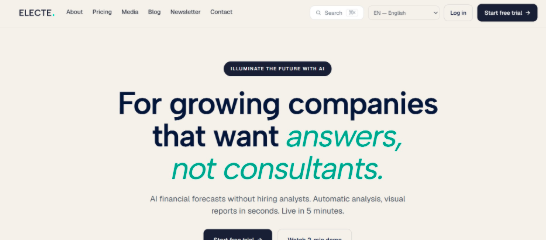
ELECTE can forecast using its AI technology which compares methods and selects the best-performing model for your data. This gives you the ability to see your financials, cash flow and sales forecasted, along with dashboards to analyze your revenue and spend.
These features make ELECTE a great tool for small teams to utilize.
- Access to 75+ integrations, including accounting, banks, spreadsheets etc.
- Ability to forecast using multiple methods, with AI deciding what will forecast best for your business
- Dashboards to monitor your business and create reports to send to your team
- AI Agent allows you to run regular analytics, create reports and even find competitor insights using your information and research
- Can get started with ELECTE in around 5 minutes, with a free trial to try out the product
Say you’re running a shop; you could pull your sales, expenses and bank transactions. See projections of how your business might perform financially and have your AI Agent help you with management reports.
ELECTE states that customer data is hosted in Germany and the platform is GDPR-compliant. You can read some of their latest reviews from Customers on Reviews.io. They mention that ELECTE was easy to use and can create great reports to share with your team.
Keep in mind that ELECTE has many features on their higher tiers. If you’re looking to take advantage of all their AI forecasting, AI Agent and Cash Flow, you’ll need to be on their Business Plan.
2. Clockwork: Best for Detailed Financial Models and Weekly Cash Planning
If you’re trying to open a new location, you may want to forecast how your business will do.
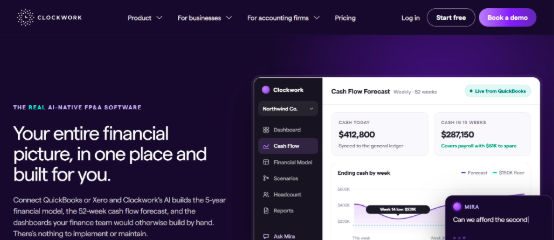
Clockwork offers AI that will help you build out your financial model, using your QuickBooks, Xero or spreadsheet data. It also gives you a weekly cash flow forecast and allows you to do what if analysis with your forecast. Clockwork also has an AI assistant called Mira, which you can ask questions about your financial model.
Clockwork gives you the opportunity to build out your model, and see how different decisions could affect your cash flow, along with doing what if scenarios.
- Build out a model to see how your P&L, Balance sheet and cash flow will look over multiple years
- See your cash flow on a weekly basis, so you can identify if you’re short on cash
- What-if scenarios allow you to play around with adding staff, changing prices and more
You could use Clockwork to see if adding staff would affect your cash and profits, before making that decision. Clockwork can be helpful if you want to dig deeper into your model.
3. Jirav: Best for Accountant-Led Budgets and Advisory Work
Jirav can help with your budget, create reports and dashboards, and gives you an AI forecasting tool. They can be used by smaller businesses, medium sized businesses and accountants looking to offer financial advice.
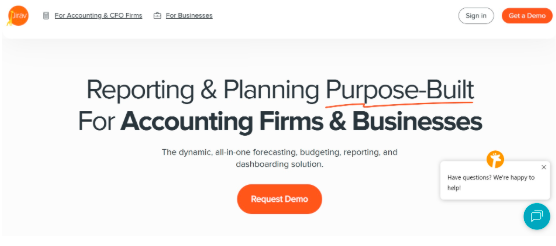
They allow you to build out your financial model and have an intelligent auto forecast which can project future results using historical patterns and, where enough data exists, seasonality. More in-depth driver based forecasting and scenario planning is available depending on your plan.
If you were an outsourced CFO, you could help your customers with monthly reporting, update their budget and play with scenarios if they wanted to add staff or increase their revenue targets.
- Allows you to do both your budget and reporting in the same place
- Has an intelligent auto forecast, that can use your previous data
- More in-depth forecasting if you’re on a higher plan
Jirav can be a good solution if you already have an accountant managing your forecast, or want to learn how to create one yourself. If you want something simpler, look at some of the other solutions on this list.
4. Abacum: Best for Collaborative Planning Across Growing Teams
When your business grows you may have multiple teams forecasting their spend for the following month, quarter or year.
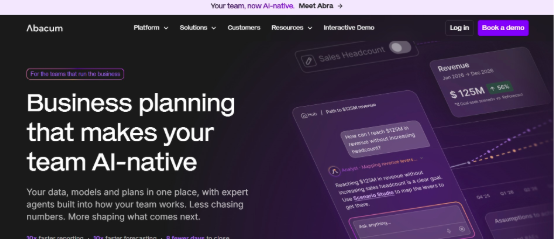
Abacum helps your teams collaborate by providing them with financial models, scenario planning, and AI that can assist with preparing data, building models, forecasting, explaining and analysing your scenarios.
They are designed to help your team work together on your forecast.
- Your budget owners can update their portion of the budget, while your finance team can keep everything on track
- Compare different scenarios against each other to assess their possible effects on your business
- Use AI to help forecast your financials, and analyse your scenarios
You could have your software development team, sales team and finance team all on one platform, instead of emailing spreadsheets back and forth.
If you have a larger finance team, and want everyone collaborating, Abacum may be a good option. Just know you may need a demo to evaluate the platform.
The Four Platforms at a Glance
| ELECTE | Clockwork | Jirav | Abacum | |
|---|---|---|---|---|
| What they’re good at | Financial Analysis, Forecasting, Dashboards, Reports, AI | Forecasting, Budgeting, Cash Flow, AI | Forecasting, Budgeting, Reports, Dashboards, AI | Team Collaboration, Forecasting, Dashboards, Reports, AI |
| Forecasting method | Multiple, AI picks best method | Model based | Intelligent Auto-Forecast, Driver Based | AI, Model Based |
| How to purchase | Various plans, Free Trial | Various Plans, Free Trial | Varies depending on plan, Demo | Demo |
All of these platforms allow you to forecast your financials, just decide how you want to forecast.
How to Choose and Validate a Forecast
Once you have decided on a platform, test it out with something that could happen in your business. Maybe you will have a lower month and want to see if you have enough cash to pay your employees.
Make sure you check:
- Are you able to plug in all your information? Make sure you’re able to connect your accounting, banks, and any other sources you want to use
- Know what is being assumed by the software, and what you need to enter yourself
- Once your period is done, look at your forecast and see how far off it was, don’t keep overwriting it
- Change something that could happen, maybe a big customer will pay later, or you need to increase spend
- Have someone who can look at outliers and make the decision
According to Citizens Bank, there are pros and cons to using AI to forecast your cash flow, but it can be very useful if you know how to use the information.
Final Verdict
If you want to dig deeper into your financial model, consider Clockwork. If you’re using an accountant to forecast, consider Jirav, or if you want your teams to collaborate, consider Abacum.
If you’re looking for an AI driven financial analysis and forecasting, then ELECTE is your best bet. With multiple methods of forecasting, you can plug in your data and see how your business might do, all powered by AI.
 There is a specific skill involved in explaining something clearly — one that is completely separate from actually knowing the subject. Kimberly S. has both. They has spent years working with business finance insights in a hands-on capacity, and an equal amount of time figuring out how to translate that experience into writing that people with different backgrounds can actually absorb and use.
Kimberly tends to approach complex subjects — Business Finance Insights, Investment Strategies and Trends, Expert Business Advice being good examples — by starting with what the reader already knows, then building outward from there rather than dropping them in the deep end. It sounds like a small thing. In practice it makes a significant difference in whether someone finishes the article or abandons it halfway through. They is also good at knowing when to stop — a surprisingly underrated skill. Some writers bury useful information under so many caveats and qualifications that the point disappears. Kimberly knows where the point is and gets there without too many detours.
The practical effect of all this is that people who read Kimberly's work tend to come away actually capable of doing something with it. Not just vaguely informed — actually capable. For a writer working in business finance insights, that is probably the best possible outcome, and it's the standard Kimberly holds they's own work to.